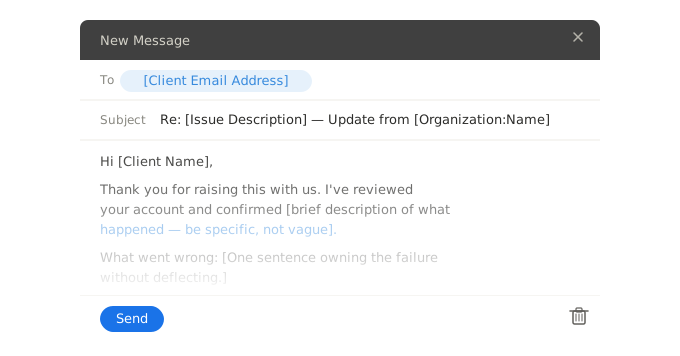
Two professional customer follow-up email templates for B2B support teams. Check in after issue resolution to confirm the fix held and maintain the relationship after a significant service interaction.
Hi [Client name],
I wanted to check in following the [Issue description] we resolved on [Resolution date].
Is everything working as expected on your end? If the issue has recurred or anything related has come up, please let me know directly and I'll pick it up straight away.
If all is well, no need to reply — I just want to make sure we've genuinely closed this out for you, not just on our end.
[VALUE("Author.FullName")]
[VALUE("Organization")] | [VALUE("Author.EmailAddress")]
Hi Client name,
I wanted to check in following the Issue description we resolved on Resolution date.
Is everything working as expected on your end? If the issue has recurred or anything related has come up, please let me know directly and I'll pick it up straight away.
If all is well, no need to reply — I just want to make sure we've genuinely closed this out for you, not just on our end.
=VALUE("Author.FullName")
=VALUE("Organization") | =VALUE("Author.EmailAddress")
Hi [Client name or company],
It's been [Time since the incident — e.g. two weeks] since [Brief reference to the incident or issue], and I wanted to reach out directly to see how things are standing from your side.
I hope the resolution has held and that [Specific outcome or fix from the resolution] has made a practical difference to your operations. If there's anything that hasn't quite landed right or anything else on your mind about how we handled things, I'd rather hear it now than not at all.
We've also [Follow-on action, improvement, or change made — remove line if not applicable].
I'm available at [VALUE("Author.EmailAddress")] if you'd like to talk.
[VALUE("Author.FullName")]
[VALUE("Organization")]
Hi Client name or company,
It's been Time since the incident — e.g. two weeks since Brief reference to the incident or issue, and I wanted to reach out directly to see how things are standing from your side.
I hope the resolution has held and that Specific outcome or fix from the resolution has made a practical difference to your operations. If there's anything that hasn't quite landed right or anything else on your mind about how we handled things, I'd rather hear it now than not at all.
We've also Follow-on action, improvement, or change made — remove line if not applicable.
I'm available at =VALUE("Author.EmailAddress") if you'd like to talk.
=VALUE("Author.FullName")
=VALUE("Organization")
Each snippet auto-populates your name, email address, and organisation name when used in WordFields. Fill in the issue-specific fields at the point of use and insert directly into your email client, CRM, or helpdesk via the Chrome extension — without switching tabs.
What's included
Each snippet auto-populates the following fields when used in WordFields:
- Client name, for direct address
- Issue description and resolution date, so the follow-up is tied to the specific interaction — not a generic check-in that could apply to any client
- A direct contact for reopening the conversation if the fix has not held
- Sender name, email address, and organisation name — pulled automatically from the logged-in user and workspace, with no manual entry required
When to send a customer follow-up email
The post-resolution check-in is sent 24 to 72 hours after a support issue has been resolved — long enough for the client to have tested the fix in their actual operations, not so long that the issue feels distant. Its function is narrow and specific: confirm the resolution is holding, and give the client a frictionless route back to the conversation if it is not. The template is deliberately short. A long follow-up email after a resolved issue reads as defensive or as a bid for positive feedback — neither of which serves the client. The closing line "no need to reply if all is well" is intentional: it signals that the email is for the client's benefit, not the team's metric tracking. Research from SuperOffice indicates that only 3% of companies send this type of follow-up. That gap is a direct relationship-building opportunity — clients who receive a genuine check-in after resolution have a measurably stronger reason to renew and expand.
The relationship follow-up is for use one to two weeks after a complaint, serious apology, or high-impact service failure — not immediately, and not weeks later when the window has closed. It serves a different purpose from the post-resolution check-in: where the check-in confirms the fix, the relationship follow-up re-establishes trust. The distinction matters operationally. A client who experienced a significant failure has had time to reflect on whether your team's response was genuine or procedural, whether the underlying problem was actually addressed, and whether they are confident in the relationship going forward. This email reaches them at that point and creates the opportunity to surface residual concerns before they crystallise into a decision to reduce reliance on your services. The optional line about follow-on actions taken — process changes, improvements made as a result of the incident — is the most powerful element: it converts the incident from a negative episode into evidence of a team that improves under pressure.
Frequently asked questions
When should you send a follow-up email after resolving a customer issue?
Send a post-resolution follow-up 24 to 72 hours after the resolution was communicated — long enough for the client to have tested the fix, not so long that the issue feels distant. For complex or high-impact issues, a week is also appropriate. The follow-up should be sent by the same person who managed the resolution, not routed through a general support queue, which signals genuine ownership rather than a process checkbox.
What should a customer follow-up email say?
Reference the specific issue that was resolved rather than using a generic 'checking in' opening. Ask a direct, closed question — 'Is everything working as expected?' — rather than an open-ended invitation that requires the client to compose a response. Give the client a clear route to reopen the conversation if the issue has recurred. Keep the email short: the purpose is confirmation and relationship maintenance, not a new exchange.
Why do so few companies send follow-up emails after support interactions?
Research from SuperOffice found that 97% of companies do not send a follow-up email to check whether a customer was satisfied with their support response. The most common reasons are ticket closure being treated as conversation closure, and the absence of a template or process that prompts agents to follow up. In B2B contexts, the cost of this omission is higher than in B2C — a client who experienced a significant issue and never heard from you again has a weaker reason to renew or expand the relationship.
Should a post-resolution follow-up be sent by the support agent or a manager?
By the person who managed the resolution, not a separate team member or manager — unless the issue was high-severity, in which case a senior follow-up signals the appropriate level of attention. Routing post-resolution follow-ups through a different contact than the one who handled the issue breaks the continuity of the conversation and can feel to the client like the original agent has already moved on.
How is a customer follow-up email different from a feedback request email?
A follow-up email's primary purpose is operational: confirming the fix held and giving the client a clear route back to support if it hasn't. A feedback request email's primary purpose is informational: gathering the client's assessment of the support experience for internal improvement or CSAT measurement. The follow-up serves the client; the feedback request serves your team. In practice, a follow-up can include a brief feedback ask as a secondary element, but leading with a satisfaction survey when the client is still in recovery from a significant issue is tactically poor.
How do you follow up with a client after a serious incident without re-opening the wound?
Reference the incident factually and briefly — don't dwell on it or re-apologise at length, which can resurface negative feelings. Lead with the forward-looking question: is everything working now? If you have a specific improvement or process change to report, include it as a concrete signal that the incident produced a tangible outcome, not just an apology. Closing on something positive and forward-looking — continued availability, next contact date — ends the interaction on stable ground.
What is a proactive customer follow-up and when should you send one?
A proactive follow-up is sent to check in with a client after a significant service interaction — complaint, apology, service failure — without waiting for the client to contact you again. It is distinct from a reactive follow-up (responding to a client's chase) and from a scheduled account review. The right time is when enough time has passed for the client's confidence to have stabilised but before enough time has passed that the original interaction has been forgotten. For most B2B interactions, that window is one to two weeks after resolution.
How do you keep customer follow-up emails consistent across a support team?
Store approved follow-up templates in a shared workspace accessible to all agents. Use fillable fields for the specific details — client name, issue reference, resolution date — so agents personalise at point of use. The most common failure in ad-hoc follow-ups is that they are either too generic ('just checking in') or too detailed (re-litigating the original issue). A template with the right structure prevents both, ensuring the follow-up is specific enough to feel personal and brief enough not to reopen the conversation unnecessarily.
Related customer service email templates
Explore more professional document and email templates you can copy, customize, and use immediately