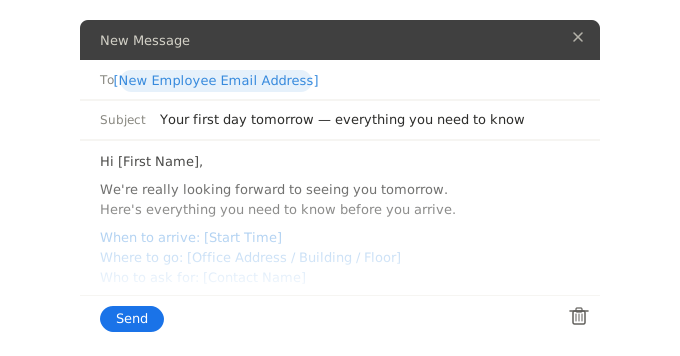
Three ready-to-use welcome email snippets for new hires — formal, casual, and remote. Copy into Gmail or Outlook in seconds, or insert directly with the WordFields Chrome extension.
Dear [Employee first name],
On behalf of the team, I am delighted to welcome you to [VALUE("Organization")]. We are very pleased to have you joining us as [Job title] and look forward to working with you.
Your start date is [Start date]. Please arrive at [Office address] by [Start time] and ask for [Reception contact name] at reception, who will meet you and guide you through your first day.
Please bring [Required documents — e.g. a valid photo ID and proof of right to work]. If you have any questions before you start, do not hesitate to contact me at [VALUE("Author.EmailAddress")] or [HR phone number].
We look forward to seeing you on [Start date (repeat)].
Kind regards,
[VALUE("Author.FullName")]
[Sender job title]
[VALUE("Organization")]
Dear Employee first name,
On behalf of the team, I am delighted to welcome you to =VALUE("Organization"). We are very pleased to have you joining us as Job title and look forward to working with you.
Your start date is Start date. Please arrive at Office address by Start time and ask for Reception contact name at reception, who will meet you and guide you through your first day.
Please bring Required documents — e.g. a valid photo ID and proof of right to work. If you have any questions before you start, do not hesitate to contact me at =VALUE("Author.EmailAddress") or HR phone number.
We look forward to seeing you on Start date (repeat).
Kind regards,
=VALUE("Author.FullName")
Sender job title
=VALUE("Organization")
Hi [Employee first name],
We're so excited to have you joining us as [Job title] — you're going to be a great addition to the team.
Your first day is [Start date]. Head to [Office address] for [Start time] and ask for [Reception contact name] — they'll get you set up and introduce you to everyone. Dress code is [], and don't worry about bringing anything other than yourself and a valid ID.
In the meantime, feel free to reach out if you have any questions at all. We're here and happy to help.
Can't wait to see you on [Start date (repeat)]!
[Sender first name]
[Sender job title], [VALUE("Organization")]
Hi Employee first name,
We're so excited to have you joining us as Job title — you're going to be a great addition to the team.
Your first day is Start date. Head to Office address for Start time and ask for Reception contact name — they'll get you set up and introduce you to everyone. Dress code is Select, and don't worry about bringing anything other than yourself and a valid ID.
In the meantime, feel free to reach out if you have any questions at all. We're here and happy to help.
Can't wait to see you on Start date (repeat)!
Sender first name
Sender job title, =VALUE("Organization")
Hi [Employee first name],
Welcome aboard! We're really glad to have you joining the team as [Job title] and want to make sure your first day goes smoothly, wherever you're logging in from.
Your start date is [Start date]. At [Start time], please join us on [Video call link] — [Host name] will be hosting your onboarding session and will walk you through everything you need to know.
Before your first day, please complete the following:
- Set up your [e.g. company email, Slack, Microsoft Teams] using the instructions sent separately
- Complete your [Pre-start paperwork description] via [Link or tool name]
- Check your inbox for your equipment delivery confirmation — your [e.g. laptop, equipment kit] should arrive by [Equipment delivery date]
If anything isn't set up or you run into any issues before you start, contact [IT contact name] at [IT contact email]. For everything else, I'm your point of contact — reply to this email or reach me at [HR phone number].
Looking forward to meeting you on [Start date (repeat)].
[VALUE("Author.FullName")]
[Sender job title]
[VALUE("Organization")]
Hi Employee first name,
Welcome aboard! We're really glad to have you joining the team as Job title and want to make sure your first day goes smoothly, wherever you're logging in from.
Your start date is Start date. At Start time, please join us on Video call link — Host name will be hosting your onboarding session and will walk you through everything you need to know.
Before your first day, please complete the following:
- Set up your e.g. company email, Slack, Microsoft Teams using the instructions sent separately
- Complete your Pre-start paperwork description via Link or tool name
- Check your inbox for your equipment delivery confirmation — your e.g. laptop, equipment kit should arrive by Equipment delivery date
If anything isn't set up or you run into any issues before you start, contact IT contact name at IT contact email. For everything else, I'm your point of contact — reply to this email or reach me at HR phone number.
Looking forward to meeting you on Start date (repeat).
=VALUE("Author.FullName")
Sender job title
=VALUE("Organization")
Save these snippets in WordFields and any manager on your team can send a personalised welcome email in under a minute — fields auto-populate from your workspace, so company name, sender details, and contact information never need to be typed manually.
What's included
Each snippet auto-populates the following fields when used in WordFields:
- Employee first name
- Job title and start date
- Office address or video call link (depending on variant)
- Contact name and HR contact details
- Company name (pulled from your workspace automatically)
- Sender name and job title (pulled from the logged-in user automatically)
When to send a new employee welcome email
Send it within 24–48 hours of the signed contract being returned — not the day before they start. The gap between signing and starting is often several weeks, and a timely email keeps the new hire informed and reassured during that window.
Some companies send two emails: one from HR covering logistics a week before the start date, and a shorter note from the hiring manager on the morning of day one. If you only send one, the hiring manager's email tends to make a stronger personal impression. Either way, having a ready-made snippet in WordFields means the right email goes out consistently — regardless of which manager is doing the hiring or how busy they are.
Frequently asked questions
What should a new employee welcome email include?
At minimum: a warm greeting using the employee's name, their start date and time, where to go or how to log in, who to contact with questions, and a brief note on what to expect on day one. For remote hires, include login credentials or instructions for accessing tools and any pre-start setup they need to complete. Keep it concise — new hires are excited, not looking for a wall of text.
When should you send a welcome email to a new employee?
Send it within 24–48 hours of the signed contract being returned, not the day before they start. BambooHR recommends sending it seven days before the start date to give the new hire time to ask questions and prepare. Some companies also send a second, shorter email on the morning of day one — a quick 'we're excited to see you today' to reinforce that they're expected and welcome.
Who should send the welcome email — HR or the hiring manager?
Either works, but they serve different purposes. An email from HR covers logistics — start time, documents, onboarding steps. An email from the hiring manager feels personal and sets the relationship tone. Many companies send both: HR handles the practical details, the manager sends a shorter, warmer note. If you only send one, the hiring manager's email tends to make a stronger first impression.
Is a welcome email the same as an offer letter or welcome letter?
No. An offer letter is a formal employment document outlining contractual terms. A welcome letter is a longer, often printed or PDF document sent after the offer is signed. A welcome email is informal, immediate, and sent directly to the new hire's inbox — it covers first-day logistics and sets a warm tone without the formality of a letter. All three serve different purposes and are typically sent at different stages.
Should a welcome email be formal or casual?
Match the tone to your company culture — this email is the new hire's first real signal of what working for you actually feels like. A formal corporate environment warrants a professional tone; a startup or creative team can afford warmth and personality. The three snippets on this page cover formal, casual, and remote variants so you can pick the one that fits without rewriting from scratch.
Related human resources templates
Explore more professional document and email templates you can copy, customize, and use immediately