
How B2B support teams standardise customer service communications using shared email templates and document attachments — from first response through complaint resolution and feedback.
B2B support teams have a consistency problem. A complaint handled by one agent reads professionally and resolves the issue. The same complaint handled by a colleague reads differently, takes a different tone, and attaches a different document — or nothing at all. The customer notices, even if they can't articulate why.
The problem is not the team. It is the absence of a shared system. When every agent writes from scratch, quality varies with experience, confidence, and how busy they are. When the team works from shared templates, every response meets the same standard regardless of who sends it.
This guide covers how B2B support teams build a shared communication library; standardised email snippets for every recurring situation, and document templates for the situations that require a formal written attachment.
Note
This guide is written for customer support leads, operations managers, and business owners responsible for how their team communicates with B2B clients.
The shared snippet library
The foundation of consistent support communication is a shared library of approved email snippets. One place where every recurring response lives, accessible to the whole team, always up to date.
Without it, team members write from scratch, copy from old tickets, or adapt whatever they sent last time. Quality varies. Tone varies. Key information gets included or omitted depending on who is responding. When a manager updates the standard wording for refund responses, half the team keeps using the old version.
A shared snippet library solves this at the structural level. Every template lives in one place. When a template is updated, the change takes effect for everyone immediately. No redistributing files, no chasing people to use the new version.
The snippets your team reaches for most in B2B support:
- Support acknowledgement email - the first response to any inbound request
- Complaint response email - structured response to a formal complaint
- Customer apology email - when the business is at fault
- Service escalation email - when a case is being escalated
- Service disruption email - proactive communication during an outage or issue
- Shipping delay email - delay notification before the customer chases
- Refund email - confirming a refund has been processed
- Customer follow-up email - checking in after a resolution
- Feedback request email - prompting a response once the issue is closed
Each snippet has fillable fields for the parts that change like client name, case reference, issue description, resolution details, and merge tags that pull in the sender's name and contact details automatically. The agent fills in the fields and sends. No drafting, no copy-pasting, no formatting.
Tip
Organise snippets into folders by type: Complaints, Escalations, Disruptions, Follow-ups. Team members find the right response faster when the library is structured rather than a flat list.
Acknowledgement and triage
The first response sets the tone for the entire interaction. In B2B support, where clients have contracted service levels and internal stakeholders watching, a slow or vague acknowledgement reads as indifference.
The support acknowledgement email does three things: confirms receipt, names the person handling the case, and sets a response deadline. All three matter. Clients don't just want to know the email arrived, they want to know who owns it and when to expect a resolution.
Send the acknowledgement within the timeframe your SLA requires and if you don't have a defined SLA, define one. The acknowledgement email is where that commitment is communicated.
Tip
Use merge tags for the sender's name and email address so each acknowledgement is personalised to the agent handling the case, not a generic "the support team" sign-off.
Complaint response
Complaint responses are the highest-stakes support communication. They are read carefully, often by multiple stakeholders on the client side, and they create a written record of how the business handled the situation.
A well-structured complaint response email covers four things in order: acknowledge the complaint specifically (not generically), state what went wrong without deflecting, confirm what has been done, and explain what will change going forward. Clients in B2B relationships are not looking for excessive apology, they are looking for a clear account of the failure and evidence that it won't recur.
What the response should not contain: passive voice, vague assurances, blame on external factors, or a request for the client to explain the issue again. All four signal that the complaint has not been taken seriously.
Escalation
Escalation communications serve two audiences: the client, who needs to know their issue is now being handled at a higher level, and the internal team, who needs to understand what is being escalated and why.
The service escalation email to the client names the new owner, confirms their contact details, and commits to a timeline. Clients who have had to escalate are already frustrated. The escalation email needs to signal that the situation has genuinely changed, not just been reassigned.
For internal escalations, use the escalation email template to communicate the issue formally to the manager or team taking ownership. A structured internal escalation creates an audit trail and ensures the new owner has full context without the client having to re-explain.
Service disruption
Proactive communication during a service disruption is one of the clearest signals of a professional support operation. Most teams wait until clients start complaining. Professional teams send the service disruption email before the first inbound ticket arrives.
The disruption email should be sent as soon as the issue is confirmed, not once it is resolved. Clients can manage around a known problem. What they cannot manage around is finding out by accident that something is broken.
The template covers what is affected, when it started, current status, and when the next update will be sent. Do not estimate a resolution time unless you are confident. An estimate that proves wrong creates a second communication failure on top of the first.
Apology and recovery
The customer apology email is used when the business is clearly at fault and the complaint response is not sufficient on its own, the impact was significant, the relationship is at risk, or the failure requires a direct acknowledgement from a senior contact.
The structure is simple: own the failure directly, explain what happened in one sentence, confirm what has been done, and state what is changing. Length does not signal sincerity. A focused two-paragraph apology reads more professionally than a lengthy one that qualifies and hedges throughout.
For situations where a goodwill gesture is appropriate like a service credit, a partial refund, an extension, confirm the details in the email and attach a formal document. A written record of what was offered and agreed protects both parties.
When to attach a document
Most support communication is handled by email alone. Some situations require a formal document attached to the email, creating a written record that both parties can file, reference, and rely on if the situation escalates further.
The situations that typically require a document attachment in B2B support:
Refund confirmation - when a refund is processed, the refund email confirms the amount, method, and expected arrival. For significant amounts, attach a formal refund confirmation letter as a PDF so the client has a document for their finance records.
Formal complaint response - for complaints that have been raised formally in writing or that involve a contractual dispute, a formal written response as an attached document carries more weight than an email body alone. It signals that the business has taken the complaint through an appropriate internal process.
Service credit or goodwill offer - any credit, discount, or goodwill gesture agreed as part of a resolution should be confirmed in a document the client can file. Verbal or email-only agreements about credits are routinely disputed later.
Escalation record - for escalations that may lead to a contract review or termination discussion, documenting the escalation formally protects the business. The service escalation email creates the initial record; a formal letter may be appropriate for serious cases.
In all these situations, the email is the communication and the document is the record. Both serve different purposes and both matter.
Warning
Do not attach documents to support emails casually. A document attachment signals formality and creates a written record. Reserve attachments for situations where a formal record is genuinely needed. Routine support responses do not require them.
Follow-up and feedback
Closing the loop after a resolution is where most support teams stop. The issue is resolved, the case is closed, and the client hears nothing further. In B2B relationships, this is a missed opportunity.
The customer follow-up email is sent 24-48 hours after resolution to confirm everything is working as expected. It takes 30 seconds to send and signals to the client that their account is actively managed, not just reactively handled.
Once confirmed, the feedback request email prompts a structured response on how the situation was handled. Feedback from resolved complaints is more honest and more actionable than general satisfaction surveys. The client has a specific experience to assess.
Tip
Keep the feedback request short, one question is enough. A client who just had an issue resolved does not want to complete a survey. A single rating question with space for a comment takes under a minute and returns useful data.
Summary: customer service templates and when to use them
| Situation | Email template | Document needed |
|---|---|---|
| First response to any inbound request | Support acknowledgement email | No |
| Formal complaint | Complaint response email | For contractual disputes |
| Business at fault | Customer apology email | For significant failures |
| Case escalated to senior contact | Service escalation email | For serious escalations |
| Outage or service issue | Service disruption email | No |
| Delivery or fulfilment delay | Shipping delay email | No |
| Refund processed | Refund email | Yes, for finance records |
| Checking in after resolution | Customer follow-up email | No |
| Prompting feedback | Feedback request email | No |
Building your support library in WordFields
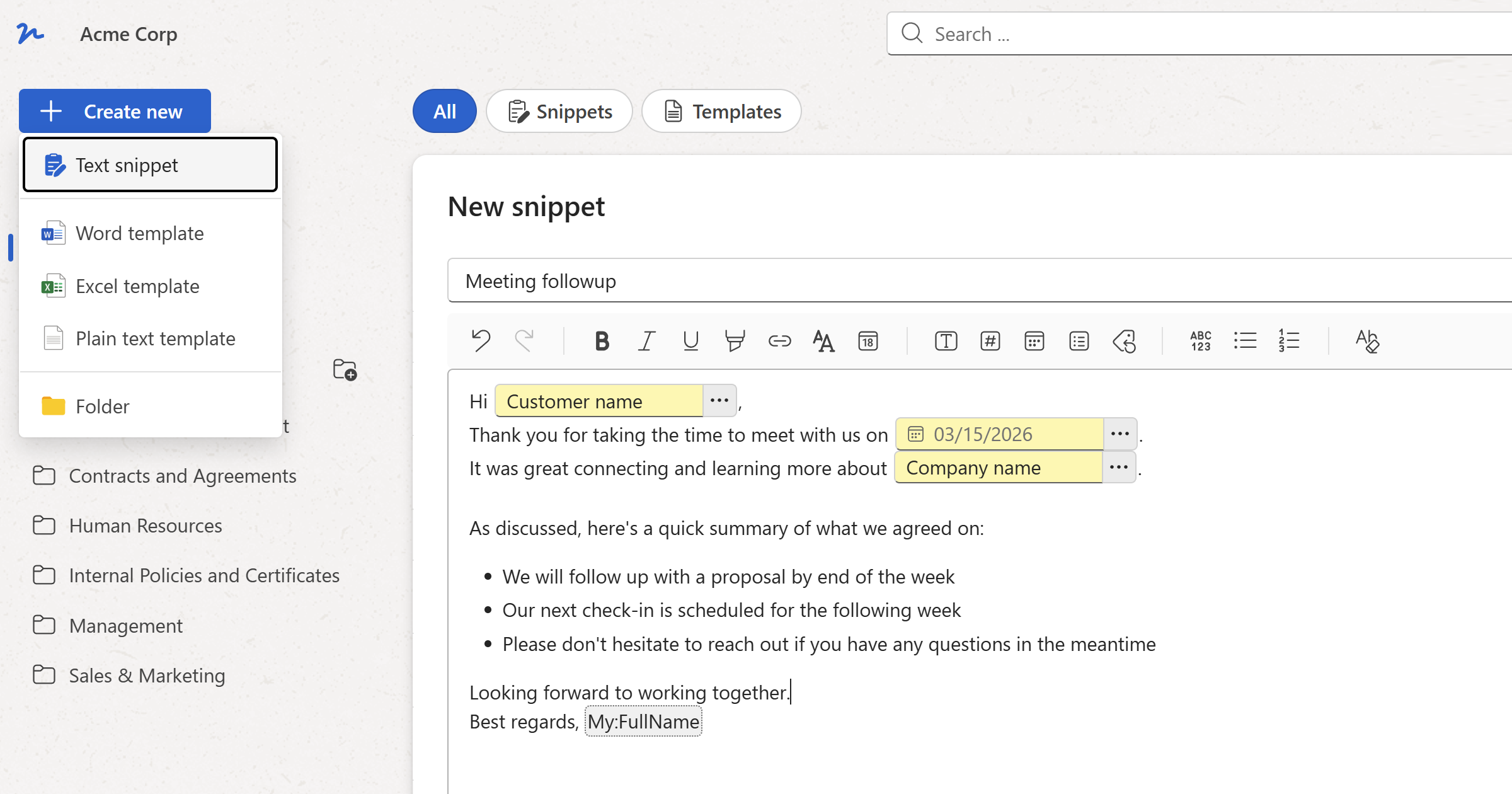
WordFields gives your support team a shared workspace where every email snippet and document template lives in one place. Team members open a snippet, fill in the case-specific fields, and copy it to their clipboard or insert it directly into their email client via the Chrome extension, without switching tabs or starting from scratch.
When a template needs updating, update it once. Every team member uses the new version immediately. No version control issues, no old templates in personal drafts folders.
For the situations that require document attachments, the same workspace holds your document templates — refund letters, formal complaint responses, service credit confirmations. Generate a correctly formatted document from a form, download it, and attach it to the email in one workflow.
See WordFields for teams and businesses to learn how to set up a shared workspace for your support team, or get started for free now.