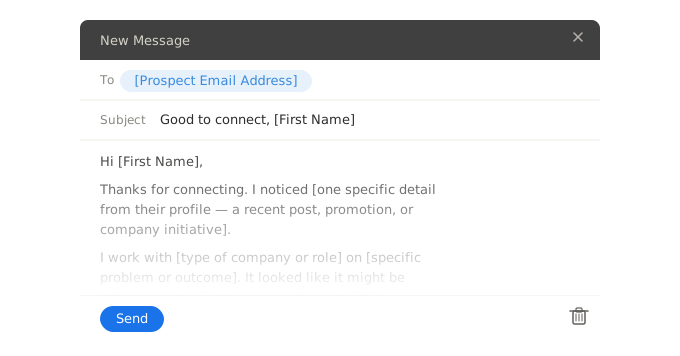
Free Word and email templates for notifying clients of a price increase — a formal letter for contract clients, a service and subscription variant, and a short email for everyday use. Fill out in WordFields and send consistently every time.
Price Increase Notice
[VALUE("Organization")]
[Organization address]
[Document date]
[Client contact full name]
[Client company name]
[Client address]
Dear [Client contact first name],
I am writing to let you know that [VALUE("Organization")] will be adjusting its pricing for [Product, service, or account description] with effect from [Effective date of the price increase].
What is changing
From [=TEXT([Effective Date], "d")], the price for [=TEXT([Product Service], "")] will increase from [Current price] to [New price] [Price Period].
| Item | Current Price | New Price | Effective Date |
|---|---|---|---|
| [Item 1 name] | [Current price] | [New price] | [=TEXT([Effective Date], "d")] |
| [Item 2 name — add or remove rows as needed] | [Current price] | [New price] | [=TEXT([Effective Date], "d")] |
Why we are making this change
[One to two sentences giving an honest, specific reason — rising costs, investment in service quality, market rate alignment]
What this means for you
Your current pricing will remain in place until [=TEXT([Effective Date], "d")]. [Optional: lock-in offer — e.g. renew before [date] to lock in the current rate. Leave blank if not applicable.]
[Optional: transition provisions — grandfathered pricing, phased increases, or goodwill gestures. Leave blank if not applicable.]
Next steps
If you have any questions about this change or would like to discuss your account, please contact [VALUE("Author.FullName")] directly at [VALUE("Author.EmailAddress")] or [Sender phone number].
Thank you for your continued business. We look forward to working with you.
Yours sincerely,
| [VALUE("Organization")] | |
| Name: [VALUE("Author.FullName")] | |
| Title: [Your job title] | |
| Email: [VALUE("Author.EmailAddress")] | |
| Date: ________________________________ |
=VALUE("Organization")
Organization address
Document date
Client contact full name
Client company name
Client address
Dear Client contact first name,
I am writing to let you know that =VALUE("Organization") will be adjusting its pricing for Product, service, or account description with effect from Effective date of the price increase.
From =TEXT([Effective Date], "d"), the price for =TEXT([Product Service], "") will increase from Current price to New price Price Period.
| Item | Current Price | New Price | Effective Date |
|---|---|---|---|
| Item 1 name | Current price | New price | =TEXT([Effective Date], "d") |
| Item 2 name — add or remove rows as needed | Current price | New price | =TEXT([Effective Date], "d") |
One to two sentences giving an honest, specific reason — rising costs, investment in service quality, market rate alignment
Your current pricing will remain in place until =TEXT([Effective Date], "d"). Optional: lock-in offer — e.g. renew before [date] to lock in the current rate. Leave blank if not applicable.
Optional: transition provisions — grandfathered pricing, phased increases, or goodwill gestures. Leave blank if not applicable.
If you have any questions about this change or would like to discuss your account, please contact =VALUE("Author.FullName") directly at =VALUE("Author.EmailAddress") or Sender phone number.
Thank you for your continued business. We look forward to working with you.
Yours sincerely,
| =VALUE("Organization") | |
| Name: =VALUE("Author.FullName") | |
| Title: Your job title | |
| Email: =VALUE("Author.EmailAddress") | |
| Date: ________________________________ |
Subscription Pricing Update
[VALUE("Organization")]
[Organization address]
[Document date]
[Client contact full name]
[Client company name]
[Client address]
Dear [Client contact first name],
I am writing to let you know that the price of your [Plan name, subscription, or retainer] with [VALUE("Organization")] will be increasing from [Effective date of the price increase].
Your updated pricing
From [=TEXT([Effective Date], "d")], your [=TEXT([Plan Name], "")] will move from [Current price] to [New price] [Billing Period].
[Optional billing cycle note — e.g. this change will take effect on your first billing date on or after [effective date]. Leave blank if not applicable.]
Why we are making this change
[Honest specific reason — investment in improvements, rising operational costs, expanded features included in the plan. Name them if applicable.]
Lock in your current rate
If you would like to lock in your current price before [=TEXT([Effective Date], "d")], [e.g. renew for a further 12 months / upgrade to an annual plan] before [Lock-in deadline date]. [Optional: contact instruction — e.g. reply to this email or call us at [number]. Leave blank if not needed.]
Questions
If you have any questions, please contact [VALUE("Author.FullName")] at [VALUE("Author.EmailAddress")]. We are here to help.
Thank you for being a [VALUE("Organization")] customer. We appreciate your continued trust.
Yours sincerely,
| [VALUE("Organization")] | |
| Name: [VALUE("Author.FullName")] | |
| Title: [Your job title] | |
| Email: [VALUE("Author.EmailAddress")] | |
| Date: ________________________________ |
=VALUE("Organization")
Organization address
Document date
Client contact full name
Client company name
Client address
Dear Client contact first name,
I am writing to let you know that the price of your Plan name, subscription, or retainer with =VALUE("Organization") will be increasing from Effective date of the price increase.
From =TEXT([Effective Date], "d"), your =TEXT([Plan Name], "") will move from Current price to New price Billing Period.
Optional billing cycle note — e.g. this change will take effect on your first billing date on or after [effective date]. Leave blank if not applicable.
Honest specific reason — investment in improvements, rising operational costs, expanded features included in the plan. Name them if applicable.
If you would like to lock in your current price before =TEXT([Effective Date], "d"), e.g. renew for a further 12 months / upgrade to an annual plan before Lock-in deadline date. Optional: contact instruction — e.g. reply to this email or call us at [number]. Leave blank if not needed.
If you have any questions, please contact =VALUE("Author.FullName") at =VALUE("Author.EmailAddress"). We are here to help.
Thank you for being a =VALUE("Organization") customer. We appreciate your continued trust.
Yours sincerely,
| =VALUE("Organization") | |
| Name: =VALUE("Author.FullName") | |
| Title: Your job title | |
| Email: =VALUE("Author.EmailAddress") | |
| Date: ________________________________ |
Hi [Client first name],
I wanted to give you advance notice that our pricing for [Product or service] will be increasing from [Effective date of the price increase].
Your new rate will be [New price] [], up from [Current price]. [One sentence reason — e.g. this reflects the rise in our operating costs / we have been investing in [specific improvement]]
Your current rate is locked in until [TEXT([Effective Date], "d")]. If you have any questions, just reply to this email.
Thank you for your continued business.
[VALUE("Author.FullName")]
[VALUE("Organization")]
[VALUE("Author.EmailAddress")]
Hi Client first name,
I wanted to give you advance notice that our pricing for Product or service will be increasing from Effective date of the price increase.
Your new rate will be New price Select, up from Current price. One sentence reason — e.g. this reflects the rise in our operating costs / we have been investing in [specific improvement]
Your current rate is locked in until =TEXT([Effective Date], "d"). If you have any questions, just reply to this email.
Thank you for your continued business.
=VALUE("Author.FullName")
=VALUE("Organization")
=VALUE("Author.EmailAddress")
Use WordFields to fill in and generate any of these — current price, new price, effective date, and reason all update from the form. Share the template with your team so every client receives the same professional, consistently formatted notice.
What's included
The document templates auto-populate the following fields when used in WordFields:
- Client contact name and company details
- Current price, new price, and effective date
- Lock-in deadline date and transition provisions
- Reason for the increase
- Sender name, job title, email, and phone number (pulled from the logged-in user automatically)
- Your company name and address (pulled from your workspace automatically)
The email snippet auto-populates prospect first name, new price, current price, effective date, and sender details.
When to send a price increase letter
Send it thirty to sixty days before the new price takes effect. That window gives clients time to plan financially, review their options, and come back with questions without feeling ambushed. For enterprise accounts or clients on long-term contracts, review the contract before sending anything — many agreements specify a minimum notice period or restrict mid-term price changes entirely. If the contract locks in current pricing until renewal, the letter sets expectations for what happens next, not what happens immediately.
For your most strategic accounts, make a phone call before the letter goes out. Not to apologise — to show respect. A client who hears about a price increase from their account manager before it lands in their inbox is far less likely to push back than one who reads it cold. The letter confirms what was discussed; the call does the relationship work.
Do not apologies in the letter. This is the single most common mistake. Phrases like "we regret to inform you" or "we are sorry for any inconvenience" signal that you are not confident the new price is justified. If your pricing is fair — and you should be sure of that before you send anything — state the change directly, give the reason honestly, thank the client for their business, and offer a contact for questions. That is all the letter needs to do.
The reason you give matters more than most businesses realise. "Increased costs" without specifics is not a reason — it is a placeholder. "Our raw material costs have risen by 18% since last year" or "We have invested significantly in [specific capability] to improve delivery times" are reasons. Specific justifications reduce pushback because they are verifiable and they signal that the decision was considered, not arbitrary. If you cannot give a specific reason, that is a signal to revisit whether the increase is the right decision at the right time.
If your team sends price increase communications to multiple clients, a shared template in WordFields means every letter carries the same structure, the same tone, and the same approved language — not whatever each account manager writes from scratch under time pressure. The form pulls in the client-specific figures; the template handles the rest.
Frequently asked questions
What should a price increase letter include?
A price increase letter should state clearly what is changing, by how much, and when the new price takes effect. It should include a brief, honest reason for the increase — rising costs, investment in quality, market conditions — and reinforce the value the client receives. It should provide a contact for questions and, where appropriate, offer a transition option such as locking in the current rate before the deadline. Keep it short. The client needs facts, not a lengthy explanation.
How much notice should you give clients of a price increase?
Thirty to sixty days is the standard for most service and product businesses. For clients on long-term contracts, check the contract first — it may specify a minimum notice period. For high-value or strategic accounts, notify them personally before the formal letter goes out. The more notice you give, the more professional the increase feels and the less likely clients are to push back or leave. Surprising a client with a price increase on their next invoice is the fastest way to damage trust.
Should you apologise for raising prices?
No. Apologising for a price increase undermines the justification for it and signals that you are not confident the new price is fair. State the increase directly, explain the reason honestly, and thank the client for their continued business. If your pricing is justified — and it should be before you send the letter — own the decision. Clients respond better to confident, clear communication than to apologetic hedging.
How do you write a price increase letter without losing clients?
Give sufficient notice, be specific about what is changing and when, give a genuine reason rather than a vague reference to costs, reinforce the value they receive, and make it easy to ask questions. For clients likely to push back, consider offering a transition option — the ability to lock in the current rate before the deadline, or a phased increase. For your most strategic accounts, call before the letter goes out. The clients most likely to leave are the ones who feel surprised, not the ones who feel respected and informed.
Can you raise prices mid-contract?
It depends on the contract. Most service contracts include a clause specifying whether and how prices can be adjusted during the term — some lock rates for the contract period, others allow annual adjustments with written notice. Review the contract before sending any price increase communication. If the contract prohibits mid-term increases, the new rate applies at renewal. If you are in a service agreement or SOW, both parties typically need to agree in writing to any price change before it takes effect.
Related sales templates
Explore more professional document and email templates you can copy, customize, and use immediately